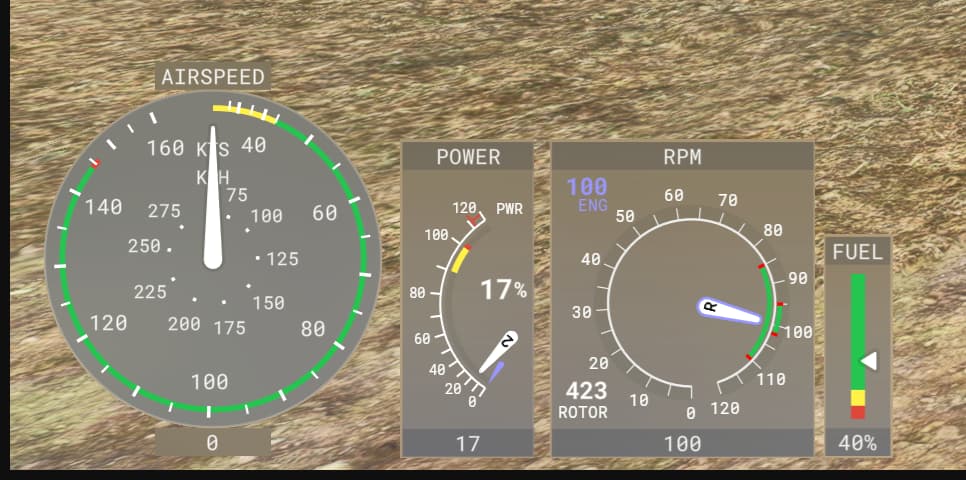
Version: all
Frequency: Consistently
Severity: Low
(Low - quality of life, workflow optimization, rare enough to not impact production, etc…
High - critical but workarounds are available, important feature not working as expected, frequent enough to impact production
Blocker - prevents from working on the project, prevents from releasing the product)
Marketplace package name: if applicable
Context: What package? When editing or mounted from Community? In main menu or in flight? etc…
Similar MSFS 2020 issue: insert url here if applicable
Bug description: Looking at the sdk documentation for the cockpit.cfg I was not able to find much information for the helicopter specific indicators. With the cockpit.cfg of another project I was able to figure out how the rpm indicator can be edited. The [HELICOPTER_ROTOR_RPM] section is not mentioned in the documention. Thats why I wonder if there is another “secret” section for the torque indicator, currently named “Power”. I would like to adapt the indicator according to my helicopter. I tried using the torque section described in the docs which was not successful.
Repro steps:
Attachments:
Private attachments: Send a PM to @PrivateContent with the link to this topic and the link to download your content