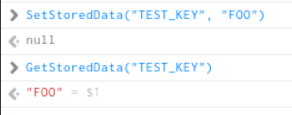
Bug description: In JS, the data store persistence using SetStoredData and GetStoredData seems to be very inconsistent. Some of our users don’t have their stored credentials load on sim restart, and looking at the underlying datastore it seems the value gets cleared.
Repro steps: Reproducing is difficult. It only affects some users, and we can’t figure out the underlying commonalities between them. In theory, you should be able to open a Coherent view and run SetStoredData("TEST_KEY", "FOO"), then run GetStoredData("TEST_KEY") to verify that it set properly. Then restart the sim and run the GetStoredData again and see that it returns an empty string
An update, we found out the commonality between the users affected. Those who exit via the sim in-game button to exit to desktop seem to have the datastore wiped. If the sim is exited via ALT+F4 or through the X button on the window, it seems to persist fine.
This is interesting, because one would assume the opposite should be happening. A graceful close should persist data, while there is room to argue whether an abrupt close should persist data.
This is a well known issue, but what you’re saying is happening seems 180 degrees to what has always been happening, and was advised from Asobo (FR iirc, in 2023 when I asked about storage limits).
I’ve always had a warning on my installation notes:
“All data is stored using the MSFS SDK data storage routines and is part of your cloud save, so is independent of the add on (unless something changes and the data needs to be migrated, which has happened in the past due to SDK changes). Cloud saves can be corrupted or lost by CTD’s however, but if that happens you have bigger issues. Never close MSFS by the top right window, as that does not trigger data saving to the cloud, always close via the bottom left menu. This is direct advice from Asobo developers.”
It’s strange that your testing is now showing the reverse?
Yeah, we experienced the same a while ago. Somehow that seems to have flipped as you said - multiple users are able to reproduce the issue by exiting via main menu vs closing the window
I’m not able to reproduce this issue. When I first reported this issue, I spoke directly with some users who tested those console commands (and thus ruling out that our products were the culprit), but I doubt I’d be able to get them to test again unfortunately.
No problem, I’ll put this report in standby for now and we’ll see if we gather more feedback at some point.
If this is a widespread issue, it will likely be reported through Zendesk and the forums as well.