Decal applied to registration on 1.5.2.0

Version: 1.5.2.0

Frequency: Consistently*

Severity: Blocker

Bug description:

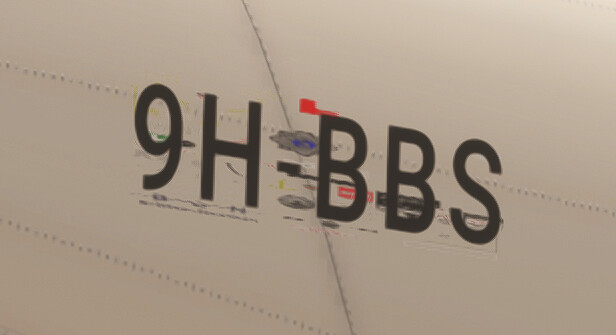
Strange texture being applied to REGISTRATION Decal (image attached)

Repro steps:

None required

Attachments:

Image of strange mapping (Please note.. the texture applied to the transparent area is actually a Decal applied elsewhere in the model and NOT APPLIED To the registration material

Edited to comply with forum rules.
Please create a dedicated bug report for the flaps issue if this is platform related. If this is a general issue, please use the forums or Zendesk platform instead.

For this issue, can you please let us know which package is impacted and provide us with a version if it’s not on the Marketplace.

Regards,
Sylvain

@FlyingRaccoon
One day in the distant future I might understand these “Forum rules” :frowning:

Ok… The affected Package is our latest FS2024 Build BN2 Islander, However the same issue crops up in ALL our Current builds ..

The N Number material has be created according to SDK Rules and I Must emphasize that NO TEXTURE MAP IS APPLIED In any of the slots ..
The Offending texture that shows up in the transparent section of the registration material is however a DECAL Texture applied to a completely separate material in the model set that is NOT Applied to the N Number polygons at any stage ..

I Am hoping you will not require the full package as we are deep into the development of a very complex product

Thank you for the additional context.

Each bug report goes through a bug tracking system where we monitor who the issue is assigned to, when it’s being worked on, when a fix candidate is available, when it’s deployed in a public build, etc… part of it being represented by the tag status we use in Discourse.
This simply cannot work when a report contains multiple completely unrelated issues.

I will run some tests to see if I’m able to replicate the problem but if not and your packages are the only one impacted by this issue, it’s going to be difficult to diagnose the issue out of thin air.
Regards,
Sylvain

AHH understood.. many thanks and my apologies

@FlyingRaccoon
Additional to the above .. today showed the attached error …
VP-FMC Is the only registration applied to this aircraft and there is nothing hard painted onto the livery sheet

@FlyingRaccoon
where would i find out if any progress has been made on this issue ?

I will update this topic and set the bug-logged tag when I have a repro, which is not the case so far.

Regards,
Sylvain

2 Likes

@FlyingRaccoon
Any action on this please ??
I have another example now in our latest project

NO PHYSICAL TEXTURE Applied to material
Virtual texture applied as REGGO_INTERIOR

result as below :frowning:

May I re-iterate that this texture is NOT Applied to the material

As I mentioned before, we cannot move forward on this if we cannot replicate the issue.
This does not occur for us on the version of the BN2 Islander currently available on the Marketplace, this does not happen on our own SimObject projects, and no one else reported the issue so far.
We cannot investigate this problem just from a screenshot.

Regards,
Sylvain

Then perhaps a suggestion as to where in Settings or system we could look ?
BTW This occurs on My system, Antony’s system and also My Son over at CRZ ..
It has also been reported several times in the Forums
I am actually Amazed to hear its not reproducible on yours???

@FlyingRaccoon

There are More … can we please have “some sort” of deeper investigation rather than just stating its not reproduceable … I think the question should start with WHY ??

:slight_smile: thanks

This could be anything, driver issue, memory corruption, asset corruption, coherent renderer regression…
You can’t just provide a report saying “strange texture” with a screenshot and expect us to come with a diagnosis and a detailed plan to address this.
If you are looking for general troubleshooting guidelines, you will find some on our Zendesk support platform:
How to restore Microsoft Flight Simulator 2024 to its vanilla state to troubleshoot issues – Microsoft Flight Simulator Support
How to clean install the simulator on PC – Microsoft Flight Simulator Support

Do 100% of your customers report the problem?
Does it happen with all variation and liveries of the BN2?
The only information you gave is that you have corrupt textures or duplicate registrations on the MSFS 2024 BN2 Islander.
I tested this aircraft, in multiple configuration and liveries, none of which produced the issue so far. I am testing this on a regular basis on both live and development builds.
I don’t have access to an unencrypted version of your package, which means I cannot run tests, inspect your panel configuration, inspect your gltf, etc…

The posts you linked are mentioning flickering/z-fighting, that is not what you reported.
Is this a different way the issue manifests itself?
Do the registration also flickers in your case but you simply didn’t mention it?

Regards,
Sylvain

@EPellissier
Eric can you add anything to this ?

@FlyingRaccoon Would you kindly let me know exactly what you require from us to allow this issue to be investigated…
I refer to the a) Spurious Material and b) The apparent Z fighting
I am happy to send a project / or part thereof if it will assist you

Many thanks in advance

Hello @NightMercury358

I have finally witnessed the z fighting issue on the latest SU4 build so that’s a beginning.
A community version of your package so we can inspect the panel.cfg and run some tests would help.
Also, if you have the texture corruption issue consistently, please let us know which variant / livery produces the problem.

Regards,
Sylvain

Hi @FlyingRaccoon Thanks for the response ..

******** Z Fighting
We have noticed the Z Fighting in ALL of our FS2024 Products but this appears to be on random occurrences ( but More often than not ) .
The N Number material have been given Z orders of 0 - 10 with no apparent difference..

When you say “ A community Version” Can I assume you just mean an Unencrypted package ?
(The easiest way for this would require an email address and I can send a copy of the product direct from our webstore ? )

******** Texture Corruption
Again this occurs with All versions and Variants of our FS2024 Builds, But with the same random occurrences leading me to think the issues may well be related ?
The Weird thing with the texture corruption is that NO Texture is applied to the N Number but it "seems” To pick up a Decal material used elsewhere in the model

Again .. I can send an unencrypted retail copy of the products for your use in investigating

Yes, an unencrypted version will do.

We are not allowed to provide an email address.
The process to provide content in private is described in section 3 here: How to report a bug or crash - [MSFS 2024] Bug Reports - MSFS DevSupport
You can provide an archive protected by a password if you want to.

Regards,
Sylvain

OK @FlyingRaccoon I dm’d a link to the unencrypted product ..
If the issues are not immediately apparent try re selecting the aircraft or changing the reg..
we also found a walkaround may help getting up close or viewing from oblique angle ..

Please let me know anything else we can help with

1 Like

I was able to replicate the flickering issue with this package.
It seems your modular configuration causes some nodes to be duplicated.
Your exterior registration gltf is used in livery.xml using airframe as a required tag. But you use this tag in both your interior and exterior part attachments so this gltf ends up being merged twice. Remove the airframe tag from the part_interior attachment and you’ll see this solves the issue.

My guess is that the registration is rendered in only one of the 2 instances of this node/material, and the other one renders whatever what was previously mapped to the texture slot.
This explains why you either have z fighting or random textures showing up.

So you probably want to use a dedicated tag that will only be defined in the exterior attachments.

Regards,
Sylvain