Version: 1.1.10.0
Frequency: Consistently
Severity: High
Bug description:
I have an aircraft gauge that crashed with "Error during KH Gauge Update - <gauge name> execution. Error code : 0xc0000005" However, I’m unable to clear the dirty status of the gauge. Reloading the aircraft through the sim menu or aircraft selector does not clear the status, even if I switch to a different aircraft and back. Loading a different, recompiled version of the gauge also does not clear the flag. The new gauge wasm compiles in the sim, but does not start and remain marked as dirty.
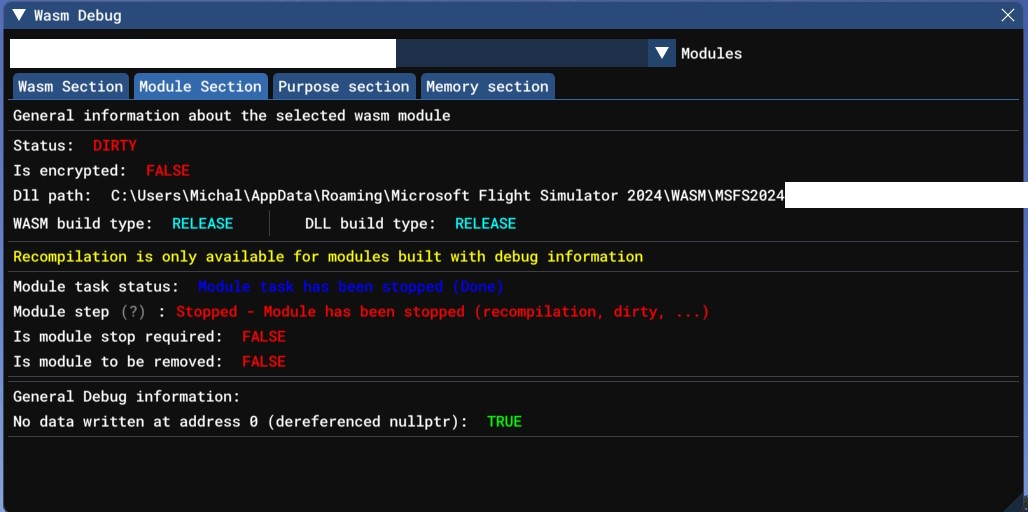
This makes troubleshooting gauge crashes much more difficult, since the simulator restart is needed after every crash. In MSFS 2020 it was enough to reload the aircraft by whatever means and that restarted gauge execution.
There was a fix related to that on similar issue in 1.0.77 changelog? Microsoft Flight Simulator 2024 DevAlpha - #17 by FlyingRaccoon
Repro steps:
- Crash the aircraft gauge
- Exit to menu and load the flight again. The gauge will not restart and will remain in dirty status.